User guide Your Account, Backup & Sync
Two-factor authentication
Two-factor authentication adds a second step to signing in: a 6-digit code from an app on your phone, alongside your password.
Worth turning on. Deeta holds a concentrated picture of the people in your life.
Turning it on
- Settings → Security → Two-Factor Authentication. The row shows Off until it's set up.
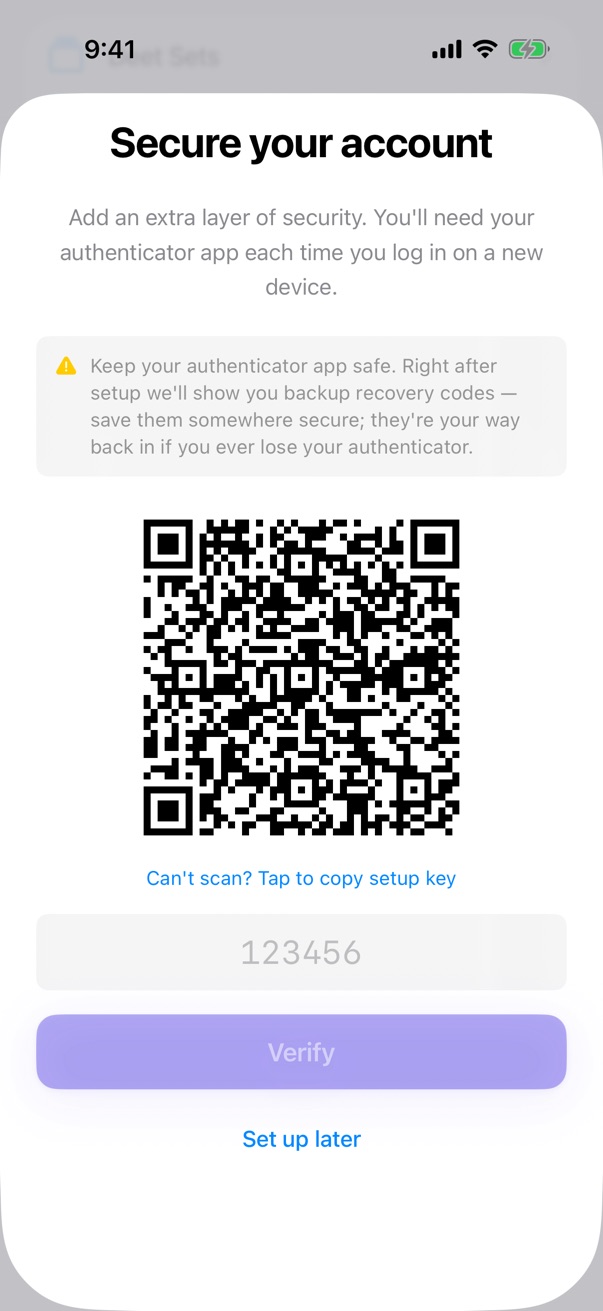
- Deeta shows a QR code.
- Scan it with an authenticator app — iPhone's built-in Passwords app works, as do Google Authenticator, 1Password and Authy.
- Type the 6-digit code it shows.
- Save your recovery codes. See below.
Once it's on, the row reads On.
Recovery codes
Once two-factor is on, Deeta gives you a set of one-time recovery codes.
These are your way back in if you lose your phone. Without them and without your authenticator, the only way back into your account is through support — and that gets you your account back, not the deets that were on the lost phone.
Put them somewhere that isn't your phone:
- Printed, in a drawer
- In a password manager on another device
- Written down with your other important papers
Each code works once. Generate a fresh set from Settings whenever you like — doing so cancels the old ones.
Signing in with it on
Password first, then the 6-digit code. Codes change every 30 seconds, so use the current one.
Turning it off
Settings → Security → Two-Factor Authentication → Turn Off. You'll be asked for a current code first — otherwise anyone with your unlocked phone could remove it.
Troubleshooting
"That code isn't right." Codes expire in 30 seconds; wait for the next one. If it keeps failing, your phone's clock may be off — turn on Set Automatically in Settings → General → Date & Time.
I've lost my phone. On the screen asking for your 6-digit code, tap Lost access to your authenticator? and enter one of your recovery codes. It signs you in and turns off two-factor authentication so you can set it up again. Each code works once.
I've lost my phone and my recovery codes. Forgot password won't help — it changes your password, but Deeta still asks for a code. Tap Lost access to your authenticator? and contact support from there, or go to deeta.app/support. We'll check it's you and turn two-factor off so you can sign in again.
That gets your account back, not your deets. They lived on the lost phone, so they come back only from that phone's iPhone backup or from an export you saved. See Backing up and restoring.
I scanned the QR code and nothing happened. Some authenticators need camera permission. Or tap to reveal the setup key and type it in manually.
Deeta asks for a code when I change my email. Yes — changing the address on the account is a step-up action, so it re-checks it's you.
I used a recovery code and it won't work again. Correct. Each is single-use. Generate a new set once you're back in.
The row says "Unavailable". Deeta couldn't check your two-factor status just now, usually because of a connection problem. Leave Settings and come back, or reopen Deeta.
Questions
Which authenticator app? Any standard one. Apple's built-in Passwords app is the simplest on iPhone.
SMS codes? No. Text messages are the weakest form of two-factor and Deeta doesn't offer them.
Does it protect my contacts on this iPhone? No — that's your iPhone's own passcode and Face ID. Two-factor protects the account.
I signed up with Apple or Google — do I need this? Turn it on with Apple or Google instead; theirs protects the same door.
Last updated
